
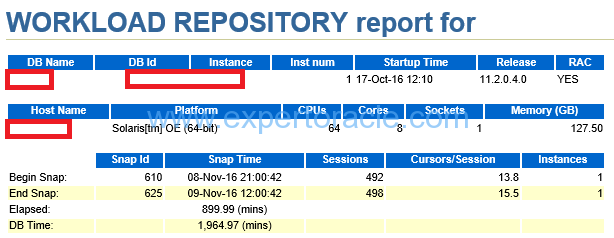
This is a fantastic script originally shared by Gokhan Atil (ORACLE ACE) that automates the generation and delivery of AWR (Automatic Workload Repository) reports via email. I’ve adapted and shared it here as it can be extremely helpful in daily database maintenance tasks.
The script utilizes Oracle’s DBMS_WORKLOAD_REPOSITORY package to generate an HTML-format AWR report and sends it via email using UTL_SMTP. Here’s how it works and how you can set it up.
DECLARE
   dbid           NUMBER;
   inst_id        NUMBER;
   bid            NUMBER;
   eid            NUMBER;
   db_unique_name VARCHAR2(30);
   host_name      VARCHAR2(64);
   starttime      CHAR (5);
   endtime        CHAR (5);
   v_from         VARCHAR2 (80);
   v_recipient    VARCHAR2 (80) := 'arvind@domain.com'; -- Replace with your email
   v_mail_host    VARCHAR2 (30) := 'YOUR_SMTP_SERVER'; -- Replace with your SMTP server
   v_mail_conn    UTL_SMTP.connection;
BEGIN
   -- Define the time window for the AWR snapshots
   starttime := '06:00';
   endtime := '10:00';

   -- Get the snapshot IDs for the specified time window
   SELECT MIN(snap_id), MAX(snap_id)
     INTO bid, eid
     FROM dba_hist_snapshot
    WHERE TO_CHAR(begin_interval_time, 'hh24:mi') >= starttime
      AND TO_CHAR(end_interval_time, 'hh24:mi') <= endtime
      AND TRUNC(begin_interval_time) = TRUNC(SYSDATE)
      AND TRUNC(end_interval_time) = TRUNC(SYSDATE);

   -- Retrieve database and instance information
   SELECT dbid, inst_id, db_unique_name
     INTO dbid, inst_id, db_unique_name
     FROM gv$database;

   SELECT host_name INTO host_name
     FROM v$instance;

   -- Define the sender's email
   v_from := db_unique_name || '@' || host_name;

   -- Set up the email connection and send the report
   v_mail_conn := UTL_SMTP.OPEN_CONNECTION(v_mail_host, 25);
   UTL_SMTP.HELO(v_mail_conn, v_mail_host);
   UTL_SMTP.MAIL(v_mail_conn, v_from);
   UTL_SMTP.RCPT(v_mail_conn, v_recipient);
   UTL_SMTP.OPEN_DATA(v_mail_conn);
   UTL_SMTP.WRITE_DATA(v_mail_conn, 'From:' || v_from || UTL_TCP.CRLF);
   UTL_SMTP.WRITE_DATA(v_mail_conn, 'To:' || v_recipient || UTL_TCP.CRLF);
   UTL_SMTP.WRITE_DATA(v_mail_conn, 'Subject: '
        || 'AWR Report of ' || v_from || ' '
        || SYSDATE || ' ' || starttime || '-' || endtime || UTL_TCP.CRLF);
   UTL_SMTP.WRITE_DATA(v_mail_conn,
        'Content-Type: text/html; charset=utf8'
        || UTL_TCP.CRLF || UTL_TCP.CRLF);

   -- Generate and attach the AWR report
   FOR c1_rec IN
      (SELECT output
         FROM TABLE (DBMS_WORKLOAD_REPOSITORY.AWR_REPORT_HTML(
            dbid, inst_id, bid, eid, 8)))
   LOOP
      UTL_SMTP.WRITE_DATA(v_mail_conn, c1_rec.output || UTL_TCP.CRLF);
   END LOOP;

   -- Finalize and close the email connection
   UTL_SMTP.CLOSE_DATA(v_mail_conn);
   UTL_SMTP.QUIT(v_mail_conn);

EXCEPTION
   WHEN UTL_SMTP.TRANSIENT_ERROR OR UTL_SMTP.PERMANENT_ERROR
   THEN
      RAISE_APPLICATION_ERROR(-20000, 'Unable to send mail: ' || SQLERRM);
END;
/
How It Works
- Time Window: The script collects snapshot IDs from
DBA_HIST_SNAPSHOTfor the specified time window (starttimeandendtime). - Database Info: It retrieves the database and instance information to customize the email headers.
- Generate Report: The DBMS_WORKLOAD_REPOSITORY.AWR_REPORT_HTML function generates the AWR report in HTML format.
- Email Setup: Using UTL_SMTP, the report is sent as an email to the specified recipient.
Prerequisites
- SMTP Server: Ensure your SMTP server is set up and accessible from the database.
- ACL Configuration: For Oracle Database 11g and higher, configure an ACL (Access Control List) to allow email sending.
Example ACL Configuration
BEGIN
   DBMS_NETWORK_ACL_ADMIN.CREATE_ACL(
      acl         => 'email_acl.xml',
      description => 'Allow email sending',
      principal   => 'YOUR_DB_USER',
      is_grant    => TRUE,
      privilege   => 'connect'
   );

   DBMS_NETWORK_ACL_ADMIN.ADD_PRIVILEGE(
      acl       => 'email_acl.xml',
      principal => 'YOUR_DB_USER',
      is_grant  => TRUE,
      privilege => 'resolve'
   );

   DBMS_NETWORK_ACL_ADMIN.ASSIGN_ACL(
      acl  => 'email_acl.xml',
      host => 'YOUR_SMTP_SERVER'
   );
END;
/
Notes
- Update the v_recipient and v_mail_host variables with your email address and SMTP server.
- The script will only work if the ACL is correctly configured and the SMTP server is accessible.
Credits
The original script was shared by Gokhan Atil, an ORACLE ACE. This adaptation is shared to assist with daily database maintenance tasks effectively.
With this script in place, you can automate AWR reporting and receive performance reports directly in your inbox. This not only saves time but also ensures you stay updated with your database’s performance trends.







 Home
Home 