
Understanding Oracle Database Background Processes and Their Functionality
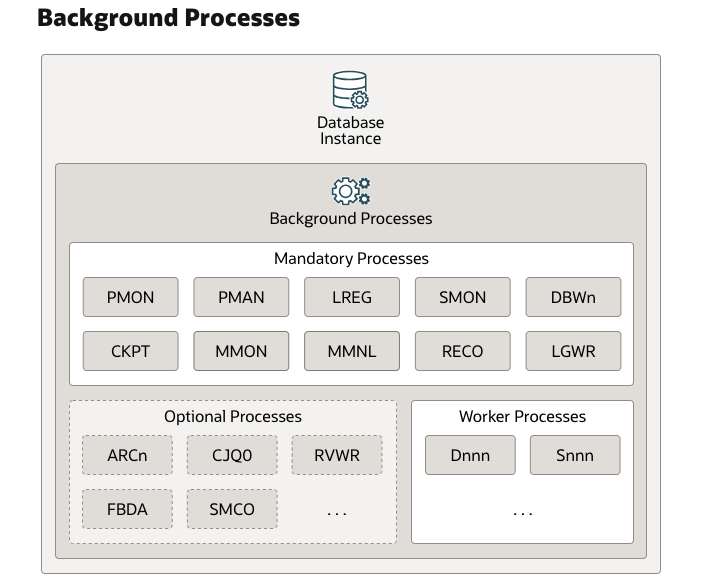
Oracle Database is an advanced relational database management system (RDBMS) that utilizes multiple background processes to ensure efficient operation, transaction management, and system recovery. These processes work together to manage memory, handle disk I/O, maintain database integrity, and ensure optimal performance.
In this article, we will explore key Oracle Database background processes, their functionalities, and provide SQL examples with explanations for better understanding.
1. Archiver Processes (ARCn)
Functionality:
The Archiver Process (ARCn) copies filled redo log files to archive storage when the database runs in ARCHIVELOG mode. This process is crucial for:
- Point-in-time recovery (PITR) in case of data loss.
- Replication in standby databases.
- Backup and recovery strategies.
Example:
To manually archive the current redo log, use:
ALTER SYSTEM ARCHIVE LOG CURRENT;
✅ Explanation: This command forces the current redo log to be archived, ensuring that all recent transactions are safely stored for recovery purposes.
2. Background Processes
Oracle background processes run continuously to manage memory, disk I/O, transaction handling, and performance tuning. Each process has a specialized role in maintaining database efficiency.
3. Checkpoint Process (CKPT)
Functionality:
The Checkpoint Process (CKPT) ensures that all modified (dirty) data buffers in memory are written to disk. It updates checkpoint information in:
- Control files
- Data files
This reduces database recovery time during crashes by ensuring committed transactions are safely written to disk.
Example:
ALTER SYSTEM CHECKPOINT;
✅ Explanation: This command manually triggers a checkpoint, forcing all modified data in memory to be written to disk, ensuring durability of committed transactions.
4. Database Writer Process (DBWn)
Functionality:
The Database Writer Process (DBWn) moves modified (dirty) buffers from the SGA (System Global Area) buffer cache to data files on disk. This process optimizes performance by:
- Writing in batches instead of immediate writes.
- Managing multiple DBWn processes for large workloads.
Example:
SELECT name, value FROM v$sysstat WHERE name = 'DBWR checkpoints';
✅ Explanation: This query checks how many times DBWn has performed a checkpoint, providing insight into database performance.
5. Flashback Data Archive Process (FBDA)
Functionality:
FBDA manages flashback archives, which store historical data changes automatically without using triggers or materialized views. This process is useful for:
- Tracking changes to sensitive tables.
- Regulatory compliance by maintaining an audit history.
Example:
ALTER TABLE employees FLASHBACK ARCHIVE;
✅ Explanation: This enables automatic history tracking for the employees table, allowing users to retrieve past data states using flashback queries.
6. Job Queue Processes (CJQ0 and Jnnn)
Functionality:
These processes handle scheduled database jobs such as:
- Batch processing (e.g., daily report generation).
- Automatic statistics gathering.
CJQ0 manages job execution, and Jnnn processes execute the jobs.
Example:
BEGIN
  DBMS_SCHEDULER.CREATE_JOB (
    job_name        => 'DATA_REFRESH_JOB',
    job_type        => 'PLSQL_BLOCK',
    job_action      => 'BEGIN refresh_data_proc; END;',
    start_date      => SYSTIMESTAMP,
    repeat_interval => 'FREQ=DAILY; BYHOUR=2',
    enabled         => TRUE
  );
END;
/
✅ Explanation: This creates a scheduled job that executes the refresh_data_proc procedure daily at 2 AM, ensuring automated data updates.
7. Listener Registration Process (LREG)
Functionality:
LREG registers the database instance with the Oracle Net Listener, enabling clients to connect to the database.
Example:
lsnrctl status
✅ Explanation: This command displays the status of the listener, verifying whether LREG has successfully registered the database.
8. Log Writer Process (LGWR)
Functionality:
The Log Writer Process (LGWR) writes redo log entries from memory (redo log buffer) to online redo log files. LGWR ensures that:
- All committed transactions are logged before completion.
- Redo logs are used for crash recovery.
Example:
COMMIT;
✅ Explanation: When a user commits a transaction, LGWR ensures that the changes are safely written to the redo logs before confirming the commit.
9. Manageability Monitor Processes (MMON and MMNL)
Functionality:
- MMON: Captures database performance statistics.
- MMNL: Writes these statistics to the Automatic Workload Repository (AWR) for performance analysis.
Example:
EXEC DBMS_WORKLOAD_REPOSITORY.CREATE_SNAPSHOT;
✅ Explanation: This manually triggers an AWR snapshot to capture current database performance metrics.
10. Process Manager (PMAN)
Functionality:
PMAN manages the lifecycle of Oracle background processes, starting and stopping them as needed.
11. Process Monitor Process (PMON) Group
Functionality:
PMON is responsible for:
- Cleaning up failed user sessions.
- Releasing locks held by crashed sessions.
Example:
SELECT username, status FROM v$session WHERE username IS NOT NULL;
✅ Explanation: This lists active database sessions, helping DBAs identify and clean up inactive or failed sessions.
12. Recoverer Process (RECO)
Functionality:
RECO resolves in-doubt distributed transactions, ensuring that transactions between databases either commit or roll back properly.
Example:
SELECT local_tran_id, state FROM dba_2pc_pending;
✅ Explanation: This query checks for unresolved distributed transactions that RECO needs to process.
13. Space Management Coordinator Process (SMCO)
Functionality:
SMCO automates:
- Tablespace management (e.g., extending tablespaces).
- Shrinking segments to reclaim unused space.
Example:
ALTER TABLE employees ENABLE ROW MOVEMENT;
ALTER TABLE employees SHRINK SPACE;
✅ Explanation: This command enables row movement and shrinks unused space in the employees table, optimizing storage usage.
14. System Monitor Process (SMON)
Functionality:
SMON performs:
- Crash recovery when the database restarts.
- Temporary segment cleanup.
- Tablespace consolidation.
Example:
SELECT tablespace_name, file_name FROM dba_temp_files;
✅ Explanation: This query checks the temporary tablespaces that SMON manages.
Conclusion
Oracle background processes play a critical role in ensuring database efficiency, transaction safety, and performance optimization. Understanding these processes helps DBAs monitor and troubleshoot database activities effectively.


