
Who this is for: anyone storing JSON in an NVARCHAR(MAX) column with a computed column and an index bolted on the side, trying to decide whether SQL Server 2025’s native json type is worth the ALTER TABLE.
We have a table called dbo.WebhookEvents that catches inbound payloads from a payments vendor: charge captured, refund issued, dispute opened, that sort of thing. It’s been NVARCHAR(MAX) since the day someone stood it up, with a computed column pulling the event type out via JSON_VALUE and an index on that computed column so we’re not scanning the whole table to route events. It worked fine for two years. Then one Tuesday morning a downstream reconciliation job threw an unhandled exception at row 40,812 out of about 60,000 and stopped cold, and on-call got paged. The payload sitting at that row was a JSON object missing its closing brace: `{“type”:”payment.captured”,”amount”:4899,”currency”:”usd”`. The vendor’s connection had timed out mid-POST three weeks earlier, our endpoint had written whatever bytes it received straight into the column, and nothing between the app and the disk ever checked whether it was valid JSON. It just sat there for three weeks looking like every other row until something finally tried to parse it. That’s what sent me digging into whether SQL Server 2025’s new json data type would have stopped that insert in the first place, and what it actually takes to migrate a table like this one.
Why This Matters
SQL Server has had JSON functions since 2016: JSON_VALUE, JSON_QUERY, OPENJSON, ISJSON, and friends. But there was never a real JSON data type behind them. You stored the document as NVARCHAR(MAX) or VARCHAR(MAX), and those functions parsed it fresh on every single read. The workaround everyone converged on, us included, was a computed column that extracts the fields you filter on most, with a regular B-tree index on the computed column. It works, but it’s still text underneath: nothing stops malformed JSON from getting written, nothing validates it on the way in, and every JSON_VALUE call reparses the whole document from a string.
SQL Server 2025 (17.x) introduces an actual json data type that stores documents in a native binary format, internally encoded as UTF-8 using the Latin1_General_100_BIN2_UTF8 collation. According to Microsoft’s documentation, the benefits are more efficient reads since the document is already parsed, more efficient writes since a query can update individual values without touching the whole document, more efficient storage optimized for compression, and no change in compatibility with existing code, meaning JSON_VALUE, JSON_QUERY, and the rest keep working against a json column with no rewrite. The one that would have caught our incident directly: input to a json column must be a well-formed JSON object or array, or the insert fails. Malformed JSON simply can’t land in the column anymore.
Reproducing the old NVARCHAR(MAX) hole
Here’s the shape of the table before any of this, and how easily a broken payload slides in:
CREATE TABLE dbo.WebhookEvents( EventId BIGINT IDENTITY PRIMARY KEY, ReceivedAt DATETIME2 NOT NULL DEFAULT SYSUTCDATETIME(), Payload NVARCHAR(MAX) NOT NULL);ALTER TABLE dbo.WebhookEvents ADD vEventType AS CAST(JSON_VALUE(Payload, '$.type') AS NVARCHAR(100)) PERSISTED;CREATE INDEX IX_WebhookEvents_EventType ON dbo.WebhookEvents(vEventType);-- a truncated payload from a timed-out vendor POST inserts without complaintINSERT INTO dbo.WebhookEvents (Payload)VALUES (N'{"type":"payment.captured","amount":4899,"currency":"usd"');-- 1 row affected, no error-- and vEventType comes back NULL, so it doesn't even show up-- under the event type it was supposed to beSELECT EventId, vEventType, PayloadFROM dbo.WebhookEventsWHERE ISJSON(Payload) = 0;
Nothing in that CREATE TABLE stops garbage from getting written. ISJSON exists specifically because SQL Server has never enforced JSON validity on a plain string column, and unless someone remembered to wrap every insert path in a CHECK (ISJSON(Payload) = 1) constraint, which we hadn’t, the column will happily take anything.
Migrating the column to json
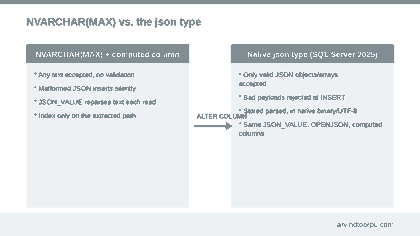
You can convert an existing varchar(max) or nvarchar(max) column to json with a plain ALTER TABLE, similar to how you’d change any other column’s type. The catch is exactly what you’d expect once you’ve seen the reproduction above: the conversion fails outright if any existing row isn’t valid JSON. Ours did.
-- find every row that would break the type conversionSELECT EventId, ReceivedAt, PayloadFROM dbo.WebhookEventsWHERE ISJSON(Payload) = 0;-- in our case: one row, the truncated payload above.-- quarantine it into a side table instead of silently deleting itINSERT INTO dbo.WebhookEvents_QuarantineSELECT * FROM dbo.WebhookEvents WHERE ISJSON(Payload) = 0;DELETE FROM dbo.WebhookEvents WHERE ISJSON(Payload) = 0;-- now the conversion itselfALTER TABLE dbo.WebhookEvents ALTER COLUMN Payload JSON NOT NULL;
A few things worth knowing before you run that last line. First, per Microsoft’s documentation the json data type is available under all database compatibility levels, so you don’t need to bump compatibility level just to use it, unlike some other SQL Server 2025 features. Second, the conversion only runs one direction: you can convert a string column to json, but you can’t convert a json column back to varchar or nvarchar with ALTER TABLE. If you need the string back you have to CAST or CONVERT it explicitly in a query, the same restriction that already applies to the xml type. Third, the computed column and index we had didn’t need to change at all. JSON_VALUE(Payload, ‘$.type’) works identically whether Payload is nvarchar(max) or json, so vEventType kept working through the migration without a rewrite.
If your webhook table is written to through Entity Framework Core, there’s a sharper edge here. EF Core 10 supports the json type, and on a database at compatibility level 170 or higher, EF will automatically migrate NVARCHAR(MAX) columns storing JSON over to the json type the next time you run a migration, according to Microsoft’s EF Core 10 release notes. That’s a database-shape change happening as a side effect of a routine EF migration, not something you explicitly asked for. If you have large text columns at compatibility level 170 that happen to look like JSON but you don’t want auto-converted, you need to explicitly keep those columns typed as NVARCHAR(MAX) in your EF model to opt out.
What actually fixed our problem, and what I skipped
The fix that mattered for our incident was just the type change itself: once Payload is json, a truncated or malformed payload gets rejected at INSERT time with a conversion error the vendor’s retry logic can catch, instead of silently landing in the table and waiting three weeks to blow up a batch job. That’s the whole win, and it required no application code changes on the read side.
What I skipped, deliberately, was SQL Server 2025’s new native JSON indexing feature (CREATE JSON INDEX), which indexes an entire json column’s contents at once instead of one extracted path. On paper it sounds like it should replace our computed-column-plus-index pattern. In practice, independent testing published shortly after SQL Server 2025 shipped found the native JSON index in a rough state: index builds that requested multi-terabyte memory grants on a table barely a gigabyte in size, resulting indexes several times larger than the underlying data, no statistics on the index, and the optimizer largely ignoring it for JSON_VALUE predicates unless you force it with an index hint, at which point the plan still did an unexplained full clustered index scan. The one query pattern that used the new index cleanly was the new JSON_CONTAINS function rather than JSON_VALUE. For now we kept the same computed-column-plus-B-tree-index approach we had before, just pointed at a json column instead of an nvarchar(max) one, since the query behavior for that pattern doesn’t change with the underlying type.
One more thing that’s easy to get wrong migrating OPENJSON calls specifically: in SQL Server 2025 (17.x), OPENJSON does support the json type directly. On some other platforms and older TDS client versions, it currently doesn’t, and you’ll hit an implicit conversion error unless you explicitly CAST the column to nvarchar(max) first. If you’re running mixed client versions or replicating to Azure SQL Database, test OPENJSON against the actual client stack you use in production rather than assuming 2025 on-prem behavior everywhere.
Where This Requires Care
The json data type is listed by Microsoft as generally available for Azure SQL Database and Azure SQL Managed Instance, but as of this writing it’s still marked in preview for SQL Server 2025 (17.x) on-premises and for SQL database in Fabric. Treat it accordingly for anything you can’t easily roll back: test thoroughly on a non-production instance and watch Microsoft’s release notes before leaning on it for a system you can’t afford to have change behavior under a cumulative update.
The modify() method for in-place updates to a json document is also currently in preview and only available in SQL Server 2025 (17.x), so don’t build a migration plan around it working identically on Azure SQL today.
There are real size ceilings worth knowing before you assume json is a drop-in replacement for every NVARCHAR(MAX) JSON column: up to 2GB of binary storage per document, up to 32,000 unique keys, a 7,998 byte limit per key string, up to 65,535 properties per object and 65,535 elements per array, and a maximum of 128 nested levels. Scalars, booleans, and bare NULL aren’t valid top-level json values either; the column only accepts a JSON object or array, so if any of your application code writes a bare number or string as a “JSON” payload today, that insert will start failing after conversion.
And test your bcp and driver paths before you cut over anything that depends on them. The bcp utility’s native format currently represents a json column as varchar or nvarchar and needs an explicit format file to handle it correctly, and depending on the TDS protocol version your client negotiates, the wire type you get back for a json column can differ between varchar(max) and nvarchar(max), which matters if downstream tooling infers the column type from what the driver reports.
Quick Reference
- ALTER TABLE … ALTER COLUMN to json works on existing varchar(max)/nvarchar(max) columns, but fails if any row isn’t valid JSON; check with ISJSON() and clean up first.
- The conversion only goes one direction: you can’t ALTER a json column back to a string type, only CAST/CONVERT it in a query.
- The json type is available at any compatibility level; you don’t need to bump to 170 to use it, though EF Core 10’s auto-migration behavior specifically is tied to 170.
- Existing JSON_VALUE, JSON_QUERY, and computed-column-plus-index patterns keep working unchanged against a json column.
- OPENJSON supports json directly on SQL Server 2025 (17.x), but may still need an explicit cast to nvarchar(max) on other platforms or older client protocol versions.
- Hold off relying on the new CREATE JSON INDEX for production query performance; independent benchmarks found it slow to build, oversized, and largely ignored by the optimizer for JSON_VALUE as of late 2025. Stick with computed columns and a regular index for now.
- The json type is still in preview for SQL Server 2025 on-premises and Fabric, and its modify() method is preview-only on 2025; both are GA on Azure SQL Database and Managed Instance.
My Take
The part of this I actually care about isn’t the storage format or the read performance, it’s that a json column will reject garbage at the door. Our incident wasn’t a performance problem, it was a validation problem that NVARCHAR(MAX) was never built to solve, and every JSON table we’ve ever run had the same silent gap. I’d convert existing JSON-shaped columns for that reason alone, even before the storage and parsing benefits kick in. What I wouldn’t do yet is rip out working computed-column indexes in favor of the new native JSON index; that part of the feature clearly needs another release or two of tuning before it’s the obvious choice. Convert the type for the validation guarantee now, keep your existing indexing strategy, and revisit CREATE JSON INDEX once there’s evidence the optimizer actually uses it the way you’d expect.


