Who this is for: anyone running native logical replication out of Aurora PostgreSQL who’s watched replay lag balloon during a big batch transaction and assumed there was nothing to do but wait it out.
We run a nightly reconciliation job against a large orders table on an Aurora PostgreSQL 16 cluster: a single UPDATE that touches something like 18 million rows to flip stale orders over to an “archived” status. That same table feeds a downstream reporting pipeline through native logical replication, an RDS for PostgreSQL subscriber that a BI dashboard reads from throughout the day. Every night, right around the time that batch job kicked off, the dashboard would go stale for several minutes, and every night someone on the analytics team would ping me asking if replication was broken. It wasn’t broken. It was doing exactly what default logical replication does with one enormous transaction: nothing, until the whole thing commits.
Why This Matters
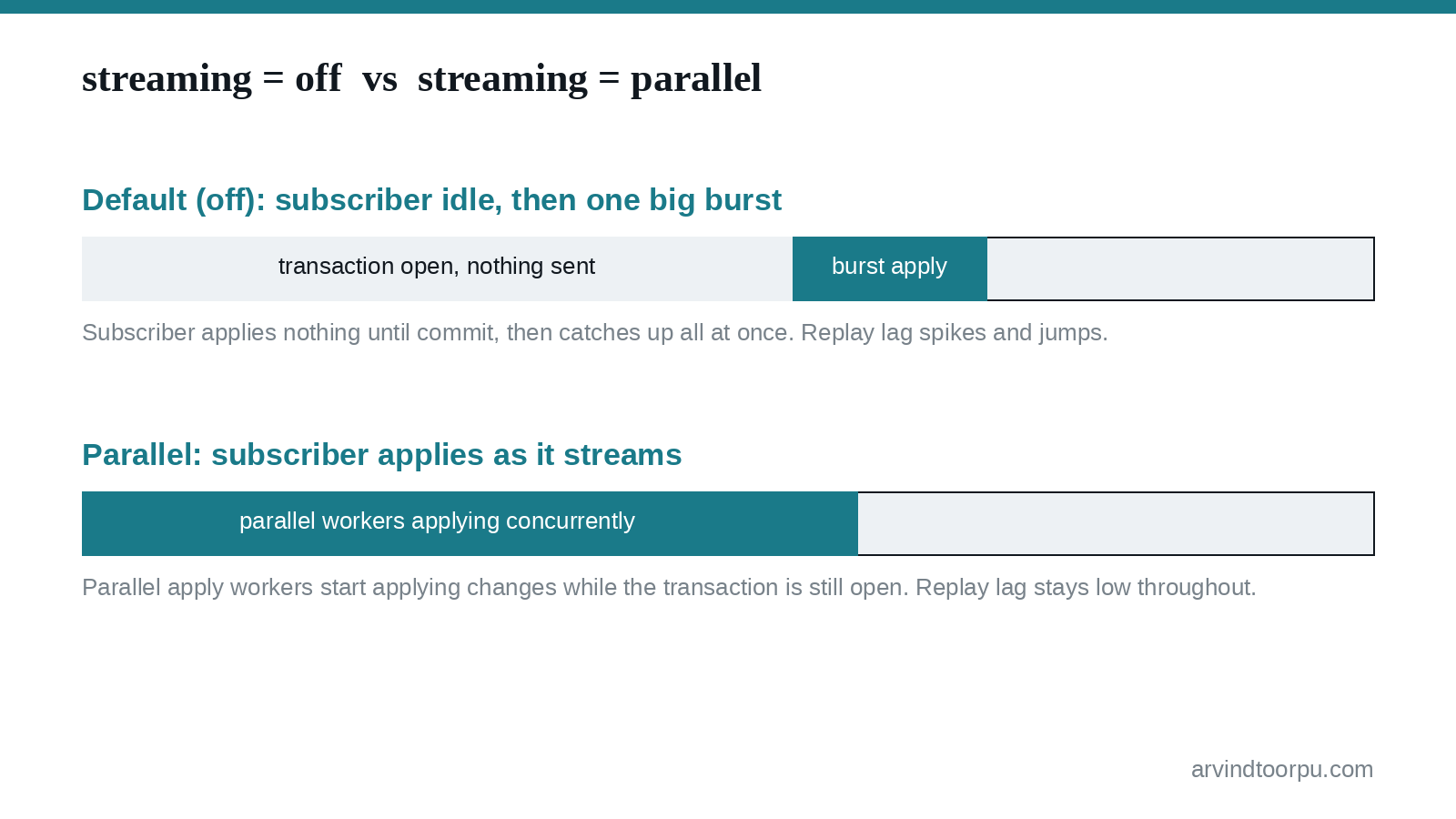
PostgreSQL’s logical replication has a subscription option called streaming that controls how in-progress transactions are handled. In its default, most conservative mode, the publisher fully decodes and buffers every change belonging to an open transaction (spilling to disk once it exceeds logical_decoding_work_mem) and only starts sending anything to the subscriber after that transaction commits on the publisher. For short transactions this is invisible. For an 18-million-row UPDATE that takes four minutes to commit, it means the subscriber receives and applies nothing for four minutes, then gets hit with the entire transaction at once.
PostgreSQL 14 introduced a streaming = on option that streams changes to the subscriber as they’re decoded rather than waiting for commit, but the subscriber still just writes them to temporary spill files and applies them serially once the commit arrives. PostgreSQL 16 went further and added streaming = parallel, letting the subscriber apply an in-progress transaction’s changes concurrently, via dedicated parallel apply workers, while the transaction is still open on the publisher. It wasn’t the default in 16 or 17. As of PostgreSQL 18, parallel is now the default for newly created subscriptions. Aurora PostgreSQL added support for major version 18 (starting at 18.3) in June 2026, but most production clusters I’ve touched are still sitting on 16 or 17, where you have to turn this on yourself.
Reproducing the lag
You can see this with a plain default subscription. On the Aurora PostgreSQL publisher:
CREATE PUBLICATION orders_pub FOR TABLE orders;
On the subscriber (an RDS for PostgreSQL 16 instance in our case), create the subscription with no streaming option specified, which leaves it at the default of off:
CREATE SUBSCRIPTION orders_sub CONNECTION 'host=aurora-writer.cluster-xxxx.us-east-1.rds.amazonaws.com dbname=app user=repl_user password=...' PUBLICATION orders_pub;
Then run a single large transaction against the publisher, something in the multi-million-row range so it takes at least a minute or two to commit:
BEGIN;UPDATE orders SET status = 'archived'WHERE status = 'closed' AND closed_at < now() - interval '90 days';COMMIT;
While that’s running, watch the publisher’s view of the replication connection:
SELECT application_name, write_lag, flush_lag, replay_lagFROM pg_stat_replicationWHERE application_name = 'orders_sub';
Under normal load, replay_lag sits under a couple of seconds. During that UPDATE, it climbed past six minutes in our case, then dropped back to near zero in one jump the instant the transaction committed and the subscriber caught up on the backlog. From the dashboard’s point of view, data just froze and then jumped, which looked a lot more alarming than “a batch job is running.”
Turning on parallel apply
The fix happens entirely on the subscriber side. First, the subscriber needs enough worker capacity to actually run parallel apply workers. On RDS for PostgreSQL, that means two static parameters in the DB parameter group, which require a reboot to take effect:
max_worker_processes, raised enough to cover logical replication workers plus your normal background worker usagemax_logical_replication_workers, raised to cover leader apply workers, table sync workers, and the parallel apply workers you’re about to add (the default is 4)
We bumped max_logical_replication_workers from 4 to 8 and max_worker_processes from 8 to 16 on the subscriber, then scheduled the reboot for a low-traffic window since it’s a Single-AZ reporting replica in our case. On a Multi-AZ instance this triggers a failover instead of a hard outage, but it’s still worth planning rather than firing off during business hours.
The third parameter, max_parallel_apply_workers_per_subscription, is dynamic and doesn’t require a reboot. Its default is already 2, which was fine for us. Then the actual switch is a one-line change to the subscription itself:
ALTER SUBSCRIPTION orders_sub SET (streaming = parallel);
You can confirm the parallel workers are actually spinning up during a streamed transaction by checking the subscriber’s activity:
SELECT pid, backend_type, state, wait_eventFROM pg_stat_activityWHERE backend_type LIKE 'logical replication%';
Re-running the same 18-million-row batch after the change, peak replay_lag dropped from just over six minutes to under 45 seconds. It didn’t go to zero, applying that many changes still takes real time, but the subscriber was working through the transaction concurrently instead of sitting idle and then choking on the whole thing at once.
Where This Requires Care
Parallel apply is opportunistic, not guaranteed. Parallel apply workers, table sync workers, and leader apply workers all draw from the same pool defined by max_logical_replication_workers. If no parallel worker is free when a streamed transaction shows up, PostgreSQL falls back to writing the changes to temporary files and applying them serially after commit, the same behavior as streaming = on. Size the worker pool for your actual subscription count, not just the one you’re testing.
Locks get held longer. A parallel apply worker begins the transaction on the subscriber as soon as streaming starts, not when it commits, so any locks that transaction takes on the subscriber are held for the full duration rather than appearing all at once at the end. If something else on that subscriber needs a conflicting lock on the same rows during your batch window, it’ll wait longer than it used to.
There’s a small deadlock risk when the publisher and subscriber schemas differ, and it can make troubleshooting harder: if an error occurs inside a parallel apply worker, the finish LSN of the remote transaction may not show up in the subscriber’s server log the way it normally would, so tracing exactly which transaction failed takes more digging.
The parallel streaming option requires PostgreSQL 16 or newer on the subscriber; it doesn’t exist on 14 or 15. And upgrading a cluster’s engine version doesn’t retroactively change an existing subscription’s streaming setting, that only affects subscriptions created after the upgrade with no explicit value. If you’re moving to Aurora PostgreSQL 18 where parallel is now the default, subscriptions you created back on 16 will still say whatever you originally set until you change them.
Quick Reference
- Default logical replication (
streaming = off) buffers an entire in-progress transaction on the publisher and sends it to the subscriber only after commit, which is what causes replay lag to spike and then jump during large transactions. streaming = parallel, added in PostgreSQL 16, lets the subscriber apply an in-progress transaction concurrently via parallel apply workers instead of waiting for commit; it became the default only in PostgreSQL 18.- On RDS/Aurora, raising
max_worker_processesandmax_logical_replication_workersrequires a reboot (static parameters);max_parallel_apply_workers_per_subscriptionis dynamic and doesn’t. - Enable it per subscription with
ALTER SUBSCRIPTION ... SET (streaming = parallel), and confirm workers are active viapg_stat_activity. - It’s opportunistic: if the worker pool is exhausted, PostgreSQL silently falls back to serial apply, so size the pool for your real subscription count.
- Parallel apply holds subscriber-side locks for longer and requires PostgreSQL 16+ on the subscriber; upgrading engine version doesn’t retroactively change existing subscriptions’ settings.
My Take
This is a good example of a feature that’s easy to miss because it’s off by default and nothing in the RDS or Aurora console flags that your subscription is leaving performance on the table. We’d been fielding the same “is replication broken” question for months before I actually went looking at what streaming options existed. Now that PostgreSQL 18 makes parallel apply the default, that gap will close on its own for new subscriptions, but if you’re still running 16 or 17 (which is most production Aurora PostgreSQL clusters right now), it’s worth an explicit ALTER SUBSCRIPTION rather than waiting for a major version upgrade to fix it for you.


