Who this is for: anyone running SQL Server 2025 who’s wondering whether flipping database compatibility level to 170 is a free performance win, a regression risk, or both.
We moved a reporting replica to SQL Server 2025 (build 17.0.1000.7) in December, mostly for the licensing runway, and left the database sitting at compatibility level 160 for a few weeks out of caution. When we finally bumped it to 170, two things happened that I wasn’t expecting. A nightly MERGE job that reconciled account balances against a heavily skewed customer table got noticeably faster and, more importantly, stopped being unpredictable. And a regional sales report stored procedure that had been quietly slow for one specific execution pattern for months suddenly started behaving. Neither of those was the headline feature I’d read about going into SQL Server 2025. I’d expected new JSON functions and vector search to be the story. Instead it was Intelligent Query Processing quietly getting smarter about two query patterns we’d been living with for a long time.
Why This Matters
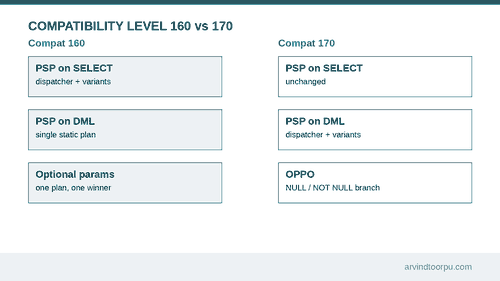
Intelligent Query Processing (IQP) is Microsoft’s umbrella term for the optimizer features that adapt a query’s execution plan to the actual data at runtime instead of relying on one static plan compiled from whatever parameter happened to run first. Parameter Sensitive Plan (PSP) optimization, part of that family since SQL Server 2022 at compatibility level 160, is the classic fix for the “it’s fast for some customers and terrible for others” problem: it compiles a dispatcher plan that routes execution to different query variants depending on the cardinality of the incoming parameter value. Until SQL Server 2025, PSP only worked on SELECT statements. Starting with SQL Server 2025 and database compatibility level 170, PSP optimization gained support for DML statements: INSERT, UPDATE, DELETE, and MERGE. That’s not a small change if your worst parameter-sniffing offenders, like ours, are batch UPDATE or MERGE jobs rather than reporting SELECTs.
Compatibility level 170 also brings Optional Parameter Plan Optimization (OPPO), a new IQP feature built on the same multiplan dispatcher infrastructure as PSP. OPPO targets a different but related pattern: stored procedures with an optional parameter that’s sometimes NULL (meaning “no filter”) and sometimes a real value. Historically that produced one cached plan tuned for whichever case compiled first, and the other case paid for it. OPPO lets the dispatcher branch the plan based on whether the parameter is NULL or NOT NULL.
Worth knowing before you assume every 2025 IQP improvement needs the 170 bump: it doesn’t. Cardinality estimation feedback for expressions, another 2025 addition, only requires compatibility level 160. OPTIMIZED_SP_EXECUTESQL, which reduces compilation storms on ad hoc sp_executesql calls, needs SQL Server 2025 but isn’t gated by compatibility level at all. PSP’s new DML support and OPPO are the two that specifically wait for 170.
What the problem looked like before the bump
Our reconciliation job runs a MERGE against an orders table with roughly 40 million rows, keyed off customer_id, and the data is badly skewed: one enterprise account has around 2.3 million order rows, while the median account has a few hundred. Before 170, that MERGE got one plan, period, and whichever customer happened to trigger the first compile after a cache flush decided what everyone else got. If the big account compiled first, the plan favored a scan-heavy strategy that was fine for 2.3 million rows but wasteful for a 300-row account. If a small account compiled first, the reverse happened and the job could blow past three hours once it hit the enterprise account with a seek-based plan that wasn’t built for that volume. You can see the shape of this on any compatibility-160 instance by forcing a recompile with a small customer, then watching sys.dm_exec_query_stats for that same statement handle as it processes a large one:
-- compile against a low-cardinality customer firstEXEC dbo.usp_ReconcileOrders @CustomerId = 40213; -- ~300 rowsGO-- same statement, now against the skewed high-cardinality customerEXEC dbo.usp_ReconcileOrders @CustomerId = 10042; -- ~2.3M rowsGOSELECT total_worker_time, total_elapsed_time, execution_countFROM sys.dm_exec_procedure_statsWHERE object_id = OBJECT_ID('dbo.usp_ReconcileOrders');
On compatibility level 160 that single cached plan serves both executions, and the elapsed time gap between them is the tell. On 170 with PSP’s DML support active, the same procedure produces a dispatcher plan with separate query variants keyed to customer_id cardinality ranges, and the gap mostly disappears.
Making the bump and confirming what changed
The bump itself is a one-line ALTER DATABASE, but do it deliberately, on a maintenance window, with Query Store already on so you have a before-and-after baseline:
ALTER DATABASE [Reporting]SET QUERY_STORE = ON ( OPERATION_MODE = READ_WRITE, QUERY_CAPTURE_MODE = AUTO);GOALTER DATABASE [Reporting]SET COMPATIBILITY_LEVEL = 170;GOSELECT compatibility_level FROM sys.databases WHERE name = 'Reporting';
After the bump, the reconciliation MERGE started showing up in Query Store as a dispatcher plan with multiple query variants underneath it instead of one plan, visible via the new sys.query_store_query_variant catalog view. You can also confirm PSP is kicking in using the query_with_parameter_sensitivity extended event, though its schema changed with SQL Server 2025 itself: the older max_skewness field is gone, replaced by a more detailed interesting_predicate_details JSON field. An existing monitoring query built against the old field names will silently stop returning what you expect on a 2025 instance regardless of compatibility level, since the extended event schema tracks the engine version, not the database’s compat setting.
The OPPO win showed up on a separate stored procedure that generates a regional sales summary, with an optional @RegionId parameter that’s NULL for an “all regions” run and a specific value otherwise. Before 170, whichever variant compiled first each morning set the tone for the day. An “all regions” compile first meant single-region runs paid for a plan sized for the whole dataset; a single-region compile first meant the all-regions run underestimated rows and blew through memory grants. After the bump, that same procedure now dispatches a distinct plan depending on whether @RegionId IS NULL or IS NOT NULL, and both cases hold steady. No code change on our end, just the compat level and a recompile.
Where This Requires Care
PSP optimization, including the new DML support, still only works with equality predicates. If your skewed MERGE or UPDATE is filtering on a range or an inequality, this doesn’t help you, and you’ll need one of the older workarounds like OPTION (RECOMPILE) or a manually maintained set of plan guides.
If you run readable secondary replicas with Query Store enabled for secondaries, know that SQL Server 2025 had a documented access violation issue when PSP query variants couldn’t determine the persisted state of their parent dispatcher statement on a secondary. Microsoft discovered this in September 2025 and resolved it in SQL Server 2025 Cumulative Update 1, released January 2026. If you’re running anything earlier than CU1 on a readable secondary with Query Store for secondary replicas turned on, patch before you lean on PSP there.
A compatibility level bump is a database-wide behavior change, not a scoped feature flag; everything else sensitive to compatibility level moves at the same time. Test on a non-production copy with Query Store capturing a representative workload first, and keep plan-forcing ready in case an unrelated query regresses even as your target query improves.
The plan cache and Query Store overhead is real too. Each query variant gets its own cache entry and, if Query Store integration is on, its own row in query_store_plan, subject to the 200-plans-per-query ceiling controlled by max_plans_per_query. Highly skewed columns with many distinct cardinality buckets can chew through that budget faster than you’d expect.
Quick Reference
- PSP optimization’s DML support (INSERT, UPDATE, DELETE, MERGE) and Optional Parameter Plan Optimization (OPPO) both require SQL Server 2025 (17.x) and database compatibility level 170, not just the 2025 engine.
- Base PSP optimization for SELECT statements still only needs compatibility level 160, unchanged since SQL Server 2022.
- Not every 2025 IQP feature needs 170: cardinality estimation feedback for expressions works at 160, and OPTIMIZED_SP_EXECUTESQL isn’t compatibility-level gated at all.
- PSP still only evaluates equality predicates, DML or not.
- Check sys.query_store_query_variant and the query_with_parameter_sensitivity extended event to confirm PSP is actually dispatching on a given statement; note that event’s field names changed with the 2025 engine itself.
- Patch to SQL Server 2025 CU1 or later before relying on PSP with Query Store on readable secondary replicas.
- Treat the compatibility level bump as a database-wide change and validate with Query Store before and after, not as a scoped opt-in for one feature.
My Take
I went into this compatibility bump expecting to evaluate new T-SQL syntax and came out of it more interested in a boring plumbing improvement: DML statements finally get the same parameter-sensitivity treatment SELECTs have had since 2022. Most of our worst query-performance surprises over the years haven’t been reporting queries, they’ve been batch jobs and stored procedures with exactly this kind of skewed, optional-parameter shape. If that’s true for your workload too, the 170 bump is worth testing specifically for that reason, not just for whatever’s on the marketing slide. Just don’t skip the Query Store baseline first. The same bump that fixed our MERGE job could just as easily surface a regression somewhere else in a database that size.


