Who this is for: anyone who has watched a database instance stay down after a crash because recovery itself hit an error, and had no option except to wait or call Oracle Support.
A former colleague of mine once had an instance crash on a Friday night, nothing dramatic, a node failure in a RAC cluster. The other surviving instance started recovery like normal: roll forward through the redo, then roll back whatever hadn’t committed. Except one transaction’s rollback kept hitting a block corruption error, and back then, a failure during transaction recovery could be irrecoverable for the entire instance. SMON couldn’t get past it, and neither could anyone else, until a DBA got on a call with Oracle Support at midnight to work out how to skip past the one broken transaction. Everything else in that container was fine. It just didn’t matter, because recovery wouldn’t move on until that one transaction was dealt with.
Oracle AI Database 26ai changes that specific failure mode. SMON can now set aside, or quarantine, the one transaction it can’t recover and keep moving, leaving the rest of the database open and usable.
Why This Matters
Instance and crash recovery in Oracle happens in two phases: rolling forward through the redo log to reconstruct all the changes up to the point of failure, then rolling back whatever was still uncommitted at that point using undo. That second phase, transaction recovery, is where things can go wrong. If the undo needed to roll back a transaction has itself been corrupted, whether from physical block corruption, logical corruption, or a memory-level internal error, transaction recovery for that transaction can fail outright.
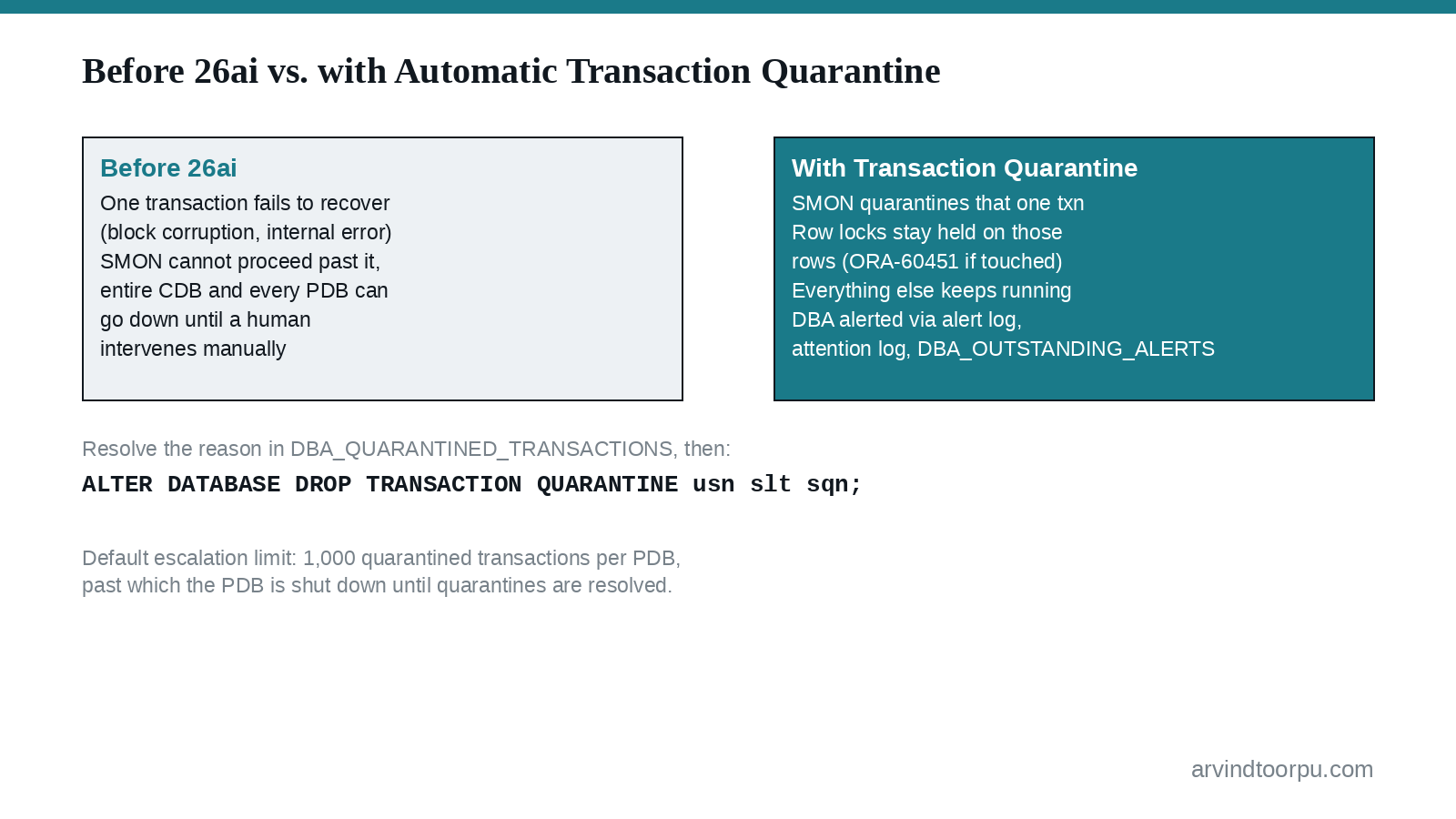
Before 26ai, that kind of failure could be irrecoverable for the whole instance. One bad transaction meant the entire container database, including every pluggable database inside it, could go down while someone worked out how to get past the corruption manually.
Starting with Oracle AI Database 26ai, SMON quarantines the specific transaction that fails to recover instead of taking the whole system down with it. The database stays open. The row locks held by that one transaction stay held, so anything touching those exact rows will wait or fail, but everything else keeps running.
What you’ll actually see
If a DML statement touches a row still locked by a quarantined transaction, it fails immediately with a clear error rather than hanging:
ORA-60451: cannot execute DML/DDL, table has rows locked by a quarantined transaction
Oracle also warns you proactively rather than making you stumble onto ORA-60451 in the wild. A transaction quarantine alert lands in the persistent alert queue, shows up in DBA_OUTSTANDING_ALERTS and DBA_ALERT_HISTORY, and (starting in 26ai) appears in the attention log alongside other critical, highly visible database events.
The actual details live in a new view, available starting in 26ai:
SELECT usn, slt, sqn, reason, undo_record_objnFROM dba_quarantined_transactions; USN SLT SQN REASON UNDO_RECORD_OBJN------ ------ ------ ---------------------- ------------------- 6 18 10 ORA-00600[ktubko_1] 73646 7 20 13 ORA-28304 73650
The REASON column tells you exactly why recovery couldn’t finish for that transaction, which is your starting point for the fix. Oracle maintains a My Oracle Support note (Doc ID 3005962.1) specifically indexed by the different corruption reasons that trigger a quarantine, with the corrective steps for each.
Resolving and dropping a quarantine
Once you’ve worked through the MOS note and fixed the underlying cause, the quarantine itself doesn’t clear on its own. Transaction recovery won’t retry until you explicitly drop it:
ALTER DATABASE DROP TRANSACTION QUARANTINE 8 20 275;
Those three numbers are the undo segment number, slot number, and sequence number of the quarantined transaction, all pulled straight from the USN, SLT, and SQN columns of DBA_QUARANTINED_TRANSACTIONS. Dropping the quarantine lets recovery pick that transaction back up and finish rolling it back, releasing the row locks it had been holding.
Where This Requires Care
Quarantines are meant for isolated, single-transaction failures, not systemic ones. If corruption is confined to one transaction, quarantining it and moving on is exactly the right behavior. If the underlying cause is broader (physical corruption spanning multiple blocks, SGA corruption, or a logical data corruption that spreads over time), quarantining one transaction and continuing may just mean the next unlucky transaction hits the same issue and gets quarantined too.
Oracle caps this at 1,000 quarantined transactions per PDB by default. Past that limit, the quarantine escalates to the database level and the PDB is shut down with shutdown abort (if archive logging is enabled and it’s feasible to do so). If you hit an escalation, the recovery path is: open the PDB, disable transaction recovery for it, resolve every outstanding quarantine from DBA_QUARANTINED_TRANSACTIONS, drop each one, then re-enable transaction recovery.
ALTER SYSTEM SET TRANSACTION_RECOVERY=DISABLED SID='*';-- resolve and drop each quarantine hereALTER SYSTEM SET TRANSACTION_RECOVERY=ENABLED SID='*';
Note that TRANSACTION_RECOVERY is a deprecated parameter, it still works for this escalation-recovery path, but it’s not something to leave toggled outside of actually resolving an escalation.
Data Guard adds its own wrinkle. Because Oracle Data Guard’s standard replication is logical for this purpose, quarantine metadata is not replicated to a standby, so what you see in DBA_QUARANTINED_TRANSACTIONS on the primary and on a standard physical standby can genuinely differ. Active Data Guard is the exception: because its replication is physical, both the dead transaction and the quarantine catalog entry get replicated to the standby. If you’re relying on a standby’s view of quarantines to make a decision, know which replication mode you’re actually running.
Quick Reference
- New in Oracle AI Database 26ai: SMON quarantines a single transaction it can’t recover instead of the corruption potentially taking down the whole instance.
- Touching rows locked by a quarantined transaction raises
ORA-60451immediately instead of hanging. DBA_QUARANTINED_TRANSACTIONS(andCDB_QUARANTINED_TRANSACTIONS) show every active quarantine, including aREASONcolumn pointing at the specific corruption error.- My Oracle Support Doc ID 3005962.1 maps quarantine reasons to corrective steps; after fixing the cause, drop the quarantine with
ALTER DATABASE DROP TRANSACTION QUARANTINE usn slt sqn. - A default limit of 1,000 quarantined transactions per PDB exists to catch systemic corruption; past that, the PDB is shut down and needs a manual disable/resolve/enable cycle on
TRANSACTION_RECOVERY. - Standard Data Guard doesn’t replicate quarantine metadata to the standby; Active Data Guard does, because its replication is physical rather than logical.
My Take
This is a quieter feature than vector search or agentic AI, but for anyone who’s actually been on the losing end of a stuck recovery, it’s one of the more meaningful reliability changes in 26ai. It doesn’t fix corruption, you still need to find and fix the root cause using the MOS note, but it changes the blast radius from “the whole container is down” to “these specific rows are locked until someone deals with it.” I’d make sure the alert channels (the alert queue, the attention log, whatever you’ve wired into your monitoring) actually surface a quarantine event quickly, since the availability win here depends entirely on someone noticing and resolving it before you hit that 1,000-transaction ceiling.


