Who this is for: anyone who has ever been paged because one hung transaction is blocking a dozen others, and whose only tool has been tracking down the blocking session and running ALTER SYSTEM KILL SESSION by hand.
A few weeks ago an app team’s batch job threw an unhandled exception halfway through updating a row in an orders table. Because of a bug in their error handling, the session never rolled back and never disconnected, it just sat there, idle, holding a row lock. Twenty minutes later, three other sessions were queued up behind it, and one of them was a checkout flow customers were actively waiting on. I found the blocker in v$session, confirmed it was safe to kill, and ran ALTER SYSTEM KILL SESSION. That’s been the playbook for as long as I’ve been doing this: find the blocker, confirm it’s safe, kill it manually. Oracle AI Database 26ai is the first release where the database can do that step itself, and it does it with more nuance than a blunt kill.
Why This Matters
A row lock is acquired for every row touched by INSERT, UPDATE, DELETE, MERGE, or SELECT ... FOR UPDATE, and it’s held until the transaction commits or rolls back. Traditionally, if a transaction holds a row lock for a long time (because the application crashed, hung, or just forgot to commit) the only way to unblock everyone else was for a DBA to notice, investigate, and manually terminate the offending session. That’s reactive by nature: something has to hurt before a human intervenes.
Starting with Oracle AI Database 26ai, the database can automatically roll back a lower-priority transaction that’s blocking a higher-priority one, based on parameters you control. Critically, it doesn’t kill the session. It rolls back the blocking transaction and leaves the session alive, which means the application gets a clean error it can catch and handle rather than a dropped connection.
Setting it up
This is an Enterprise Edition feature, and it’s off by default in a specific way: every transaction starts at HIGH priority, and Oracle never rolls back a HIGH priority transaction. So the feature only does anything once you’ve told at least some of your transactions to run at a lower priority.
Transaction priority is a session-level setting:
ALTER SESSION SET "txn_priority" = "LOW";
Valid values are LOW, MEDIUM, and HIGH. It has to be set before a transaction starts; if the session already has an active transaction, Oracle raises ORA-63304. It also can’t be set for a scheduler job (ORA-63303).
Setting priority alone doesn’t enable anything. You also need system-level wait targets, which control how long a higher-priority transaction will wait before Oracle attempts to roll back the blocker:
ALTER SYSTEM SET priority_txns_high_wait_target = 20;ALTER SYSTEM SET priority_txns_medium_wait_target = 20;
The feature is only active once both a transaction’s priority and the corresponding system wait target are set. There’s no wait target for LOW, because Oracle never rolls back a blocker on behalf of a LOW priority waiter.
There’s also a mode switch, PRIORITY_TXNS_MODE, worth knowing about before you turn this on in production:
ALTER SYSTEM SET "priority_txns_mode" = "TRACK";
In TRACK mode, Oracle increments statistics in V$SYSSTAT showing how many rollbacks it would have triggered, without actually rolling anything back. That’s how you figure out realistic wait target values from your actual workload before flipping to the default ROLLBACK mode and letting it act for real.
Seeing it happen
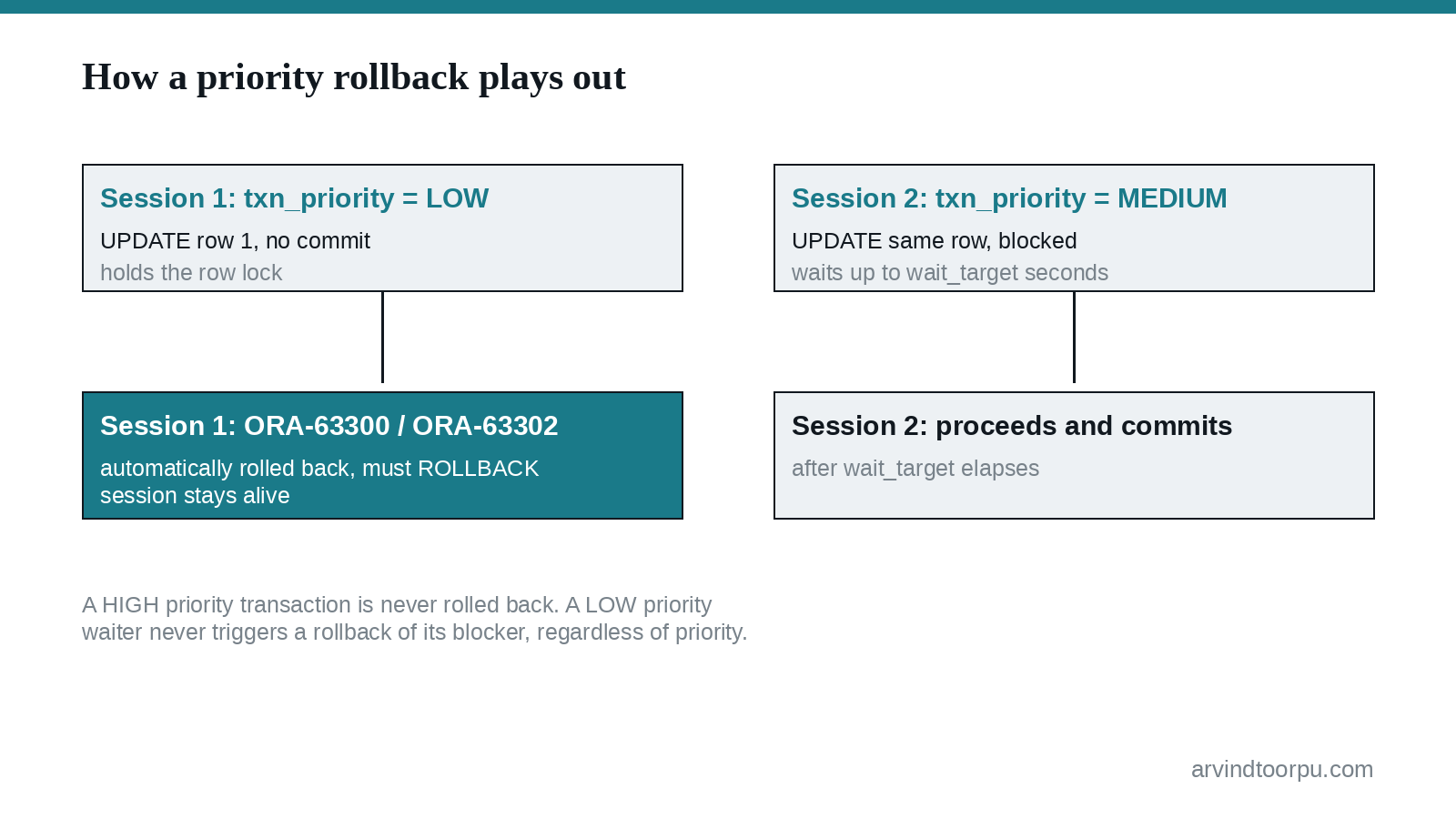
With wait targets set to 20 seconds, open two sessions as the same schema user. In session 1, update a row and don’t commit:
-- Session 1, priority LOW (the default we set)UPDATE t1 SET description = 'TWO' WHERE id = 1;-- no commit
In session 2, bump the priority up and try to update the same row:
-- Session 2ALTER SESSION SET "txn_priority" = "MEDIUM";UPDATE t1 SET description = 'THREE' WHERE id = 1;COMMIT;
Session 2 stalls for roughly 20 seconds, then completes and commits. Back in session 1, the next statement returns:
ORA-63302: Transaction must roll backORA-63300: Transaction is automatically rolled back since it is blocking ahigher priority transaction from another session.
Session 1 has to issue ROLLBACK before it can run anything else; every statement until then throws ORA-63302. That acknowledgment step is deliberate. It forces the application to notice its transaction got rolled back instead of silently assuming it committed.
Where This Requires Care
Your application code has to actually handle this. Every client library has its own rollback call, connection.rollback() in JDBC, OCITransRollback() in OCI, a plain ROLLBACK statement in SQL*Plus or SQLcl, and your error handling needs to catch ORA-63300 and ORA-63302 specifically and issue it. If you don’t, the session is stuck throwing ORA-63302 on every subsequent statement until something does.
Autonomous transactions make this messier than it first looks. If an autonomous transaction blocks a higher-priority transaction, Oracle rolls back not just the autonomous transaction but every autonomous transaction started after it, plus all preceding transactions including the main one. If you lean on autonomous transactions for logging or auditing inside a larger unit of work, understand that a priority rollback there can take the whole chain down with it.
Distributed and XA transactions behave a little differently: a remote branch getting rolled back doesn’t immediately surface an error on the coordinator, it only shows up once the coordinator issues a statement against that specific branch. It’s easy to assume the whole distributed transaction fails atomically and immediately; it doesn’t.
Background processes and scheduler jobs are never affected, and you can’t set TXN_PRIORITY for a scheduler job at all. And it’s entirely on you to assign sensible priorities. Nothing in Oracle infers which of your transactions matter more; if you mark your checkout flow LOW and a nightly cleanup job HIGH, you’ll get exactly the opposite of what you wanted.
Quick Reference
- New in Oracle AI Database 26ai (Enterprise Edition only): the database can automatically roll back a lower-priority transaction that’s blocking a higher-priority one on a row lock.
- All transactions default to
HIGHpriority, and Oracle never rolls back aHIGHpriority transaction; you have to explicitly set lower priorities withALTER SESSION SET "txn_priority"for the feature to do anything. - Both a transaction’s priority and the matching system wait target (
PRIORITY_TXNS_HIGH_WAIT_TARGET/PRIORITY_TXNS_MEDIUM_WAIT_TARGET) must be set for rollback to actually trigger. - Use
PRIORITY_TXNS_MODE = TRACKfirst to see how often this would fire against your real workload before switching toROLLBACKmode. - The rolled-back session stays alive but must issue
ROLLBACKto acknowledge before running further SQL; your application needs to catchORA-63300/ORA-63302and handle it. - Autonomous transactions, distributed transactions, and scheduler jobs all have distinct, non-obvious behavior under this feature; read the considerations before enabling it broadly.
My Take
This is one of those features that sounds simple in a release notes bullet point and turns out to have a surprising amount of thought behind it once you dig in, the TRACK mode for dry-running it, the acknowledgment requirement instead of a silent kill, the careful handling of autonomous and distributed transactions. It won’t replace good application error handling, and it genuinely can bite you if you assign priorities carelessly. But for the specific failure mode of “one forgotten transaction is now blocking something that actually matters,” this closes a gap that used to require a human watching a dashboard. I’d start in TRACK mode on a non-critical schema, see what it would have done, and go from there.


